Logo Strive Enterprise

Getting A Website: What You Need To Know

by Charleen Montano April 1, 2022

So, you’re thinking of getting a website for your business.

But you’re stuck on the process of where to start, what should be things to consider, and you’re having trouble getting the best design that fits your business.

Do you really need a website? Is getting a website essential to growing a business?

Well, yes, and yes!

“Your website is one of the biggest assets your business has, it’s like a salesman that never stops and keeps your door open 24/7”

You can think of your website as the front door to your business; it provides your clients with more information about you and gives them a sense of what you offer. So, make a good impression through it by taking the time to learn about what you need to know before getting one.

Ready to dig in? 

Let’s do this.

Is video more your thing? See the video version of the post, right here:

See dozens more videos on our YouTube channel.

Jose Silvera – YouTube

In this guide we will be covering the following:

What is a Website? (Most common types of Websites)

How does the website work?

Why do you need a website?

The 5 Elements to know before getting a website

How do you want your website to serve your business? (Factors to consider when getting a website)

Ready to get the most creative and catchy website?

WHAT IS A WEBSITE?

OK, let’s start by defining it briefly.

So, what is a website exactly?

Generally, a website consists of one or more web pages as well as related content that is published on one or more servers under a common domain name.

Websites usually consist of photos, videos, and text, and contain information about a business or organization.

Examples are wikipedia.orggoogle.com, and amazon.com. All publicly accessible websites collectively constitute the World Wide Web.

But what are the types of Websites by the way?

What kind of websites will you actually need?

There are actually dozens of different types of websites, and choosing one that is right for your business is crucial. And in order to choose the web that is right for your needs as a designer or small business owner, you need to be familiar with all the types of web pages available.

And because we care for you so much, here are the most popular type of websites you should know:

  • Business

            Basically, a business website serves to provide general information about your company or as a platform for e-commerce.

  • eCommerce

            It allows people to buy and sell physical goods, services, and digital products online rather than in a physical location. It also allows a business to accept orders, ship and handle logistics, and provide customer service.

  • Personal Blog

            This site allows people to share their experiences or information with other readers on any topic.

  • Online Portfolio

            Online portfolios (also called digital portfolios) are a digital collection of works, skills, and experiences that you have developed.

  • Online forum

            A website that facilitates the exchange of information between users about a particular topic. The forum allows for questions and answers and may be monitored to ensure that the content is appropriate.

  • Non-profit websites

            While non-profit websites do not intend to sell products or services to their visitors, they still need to convince people to donate to their cause. Charity organizations use their websites to connect with potential patrons.

  • Brochure website

                        It is a short site that contains the main information people need to know about your business. In addition to allowing uninterrupted access to information about you and providing communication with those who visit your website, the brochure website also serves as a communication tool for your customers.

Often, business uses their websites to attract leads or prospects but don’t close sales through them. Instead, the website aims to generate qualified leads and allow them to submit their information to the business, who will then contact them directly.

It should be obvious by now that the purpose of having a website is to express yourself in any way you wish.

But, let me explain it further, but briefly….

HOW DOES THE WEBSITE WORK?

Not a techie? No worries. It is vital that you know how a website works to avoid being taken for a ride in the future.
It’s easy for anyone to understand what a website is: we click on the letters with the blue thing, we Google things, we type in the www-dot-something, then we are looking for a bunch of pictures. Websites work like that right?

To explain it further, as soon as your domain name is typed into a visitor’s browser address bar, their computer makes a request to connect to your web server. DNS looks up the server’s IP address before the request reaches the webserver.

Web servers are internet-connected computers that receive requests to display web pages. An IP address provides your computer with access to a web server.

That’s how websites work.

Don’t worry, you don’t need to understand everything to get a website. Just knowing a simple glimpse of how it works will do. You just gotta have an idea.

Really.

Now, you got an idea of what is a website and how it works. And now you are thinking, why do you need one.

Are you a small business owner? Did you just start your business and your friend told you that you need to get one?

Hmm, I like your friend.

Really.

So, if I was right then keep reading. We will help you out.

WHY DO YOU NEED A WEBSITE?

 The majority of businesses cannot survive without a web presence, so there is no reason not to have one. You can make great use of your company’s website as an effective marketing tool. The benefits outweigh the downsides.

 In fact, “81% of retail shoppers research products online buying.” GE Capital Retail Bank reports that a majority of retail consumers start their search online.

Customers would be unlikely to think of you without a website.

Therefore, if you do not have a website for your business then you are not set up for success.

 Now, you must be thinking “So, does this mean I simply need a website to gain customers and then become successful?”

 The answer is: Yes and no, my friend.

 Businesses often make the mistake of thinking that any website will do. The logic goes: If you build it, they will come. Beware! It is also better to not have a website than have a bad one.

 By getting a website, I recommend you talk to an expert about it. They can help you out with the type of website you are looking for or what may be the type of website that fits your business. Or if you have a friend that can help you out, then talk to them.

 The process of getting a website is not that as simple as “Hello, and thank you.” You need to go through all the factors to consider. Talk to someone you can trust to avoid making a mistake and regret it in the future.

Trust me, it will all be worth it!

 And because we care a lot about you so much,

 Here’s the list of things presented by Jose Silvera – Owner of the GUI Web Pro, CEO of Strive Enterprise, a website expert, digital Marketer recognized by Google, and Bing ads for training campaigns with over 100% conversion rates.

THE 5 ELEMENTS YOU SHOULD HAVE BEFORE YOU BEGIN GETTING A WEBSITE:

Images
Make sure you have images that represent your business. Whether you hire a professional photographer or a friend who takes good photographs, I recommend taking your own picture. It is important to get your original picture.

Imagine visiting a website and seeing familiar Google images, the experience will make a bad impression on you and your business.

Images can be used to draw attention to your site and direct your visitor’s gaze. Using them to present information can be very beneficial. Additionally, images are a great way to draw your visitors in and engage them in your content.

 Now, you must realize that using your own pictures on your site will not only make you unique but will also help you build rapport and trust with your customers.

 Domain Name

A good way to name your website is [Businessname].com. In addition to making your website appear more professional, by having a website address such as this, you can establish a brand.

 Avoid having a website name such as  “We are the best in the market – dot-com.” — No! Please. Do you know how that sounds?

 I hope you know.

 It sounds lame, my friend. So, do me a favor. Don’t do that. Thank you.

 Remember this formula: yourbusinessname.com that will do the trick.

 Text / Content

When getting a website, you should also consider getting the text before you begin. Think about what you really want to highlight such as your experiences.

Content that captures the reader’s attention can be challenging. The average website visitor will spend just a few seconds on the page before deciding what to do. To figure this out, you must also know your audience, which we will discuss later on this page, by doing so, as they are seeing what they want, they are most likely to stay longer and even engaged.

Logo
By creating an original logo for your business, you will be able to create or establish your brand. You should ensure it is creative and attractive enough to catch the attention of potential clients.

 Ensure your logo reflects your business and the services you provide.

 You can hire someone to create one for you by getting freelancers from websites such as fiverr.com and upwork.com and of course, pays them as per their particular rate in dollars to build an awesome logo for you. Or, you can create your own if you are crafty and know how to use Photoshop.

 Now, if you have these 5 elements, you are good to go.

 Do not even begin until you have it!

 OK, So, you have those 5 things done? Now what?

 WELL, THE NEXT THING TO CONSIDER IS: HOW YOU WANT YOUR WEBSITE TO SERVE YOUR BUSINESS…

 Think about…..

What is the Purpose of your website? Or what SHOULD be the purpose of your website?

                   This could be something like, “I want to have some online presence because my business is already established and I’m doing fine.” Or you just want people to glance at your design and the stuff you do, or you want to have a place you want to show your portfolio, and whatever…

Just think of the things like, what do you want a website to do for you, what do you want the website to accomplish, or why do you want a website?

Let me help you…

Understand Your Customer.

A businessman should, of course, understand their customer by doing some research and knowing who they are and what they want such as general preferences that could easily catch their interest. 

“In the business world, it doesn’t matter what you like, but what the customer likes!”

So, here is what he got to say for getting to understand your customer: Get a sheet of paper and make your customer’s profile.

 Take note: If you are a business owner, you are helping your customer’s problem. You are solving them. So, figure out what their problem is and make a solution for them.

In general: By knowing your customer’s backgrounds, you will have an idea of what they want and how to help them out. Build a rapport!

Keep in mind: Only the relevant things, you can ask them. Don’t be a stalker, it’s illegal:)

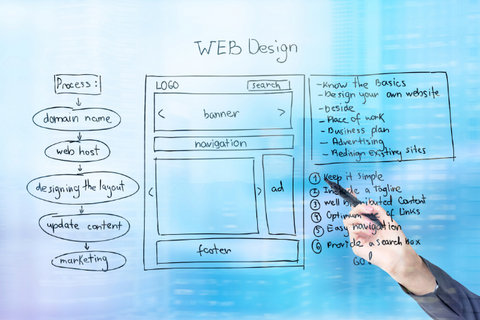
 Create an Appropriate Design.

Now, we get to the part of the design. You might want to consider how your website should look, but you have no idea what that should be like. Make sure to not make your website look like that of your competitors, or you will fall behind them. 

Making a good impression on potential customers is easier with a well-designed website. You can also nurture leads more effectively and increase conversion rates. More importantly, it provides an enjoyable user experience for your website visitors, allowing them to navigate and access it easily.

So, by getting a website you should also make a big consideration on what is your customer’s general ideal design. And going back to the last topic, you can achieve this by getting to know their preferences and how you can make it an enjoyable experience for them for visiting your website.

Remember to always think about how to keep your customers interested in your business, and don’t even consider what your competitors do to their sites.

“If you just copy the competition, they will always be ahead of you.”

Be unique and original!

Dominate the market!

Be the map, let them follow you!

READY TO CREATE THE MOST AMAZING AND CATCHY WEBSITE?

 If you’ve made it this far, then looks like you can start looking for a good designer/developer.

 Great business owners aren’t born, they are made.

 Go and take the lead!

 Hey, before we say goodbye. Would like to meet the most amazing web developers that can help you with your problem in getting the right website for you?

 I know,

 I should’ve said it before, but here you go….

Contact us!

(833) 886-2681

Strive Enterprise Official Website

Strive Enterprise has been selected among the Top Web Design Companies in Las Vegas by Designrush

We are the Best Web developers & Online Marketers in Las Vegas, Nevada!

Check out our Portfolio

We Also Offer Digital Marketing For Small & Big Businesses, SEO, E-Commerce, WordPress, PPC Campaign Development & Management for Google, Bing & Yahoo!, Facebook Ads, and more!
Adios!  See you!

Strive Enterprise has been selected among the Top Web Design Companies in Las Vegas by Design rush
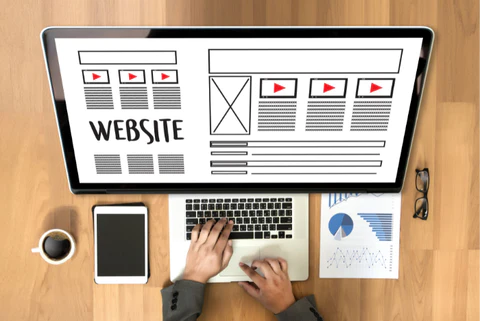

A Quick Explanation of Web Design & Web Development

The internet is a big place, and you don’t have time to wander aimlessly through the World Wide Web. You’ve got places to go and things to do, and you need a map that shows you the way.||

That’s where web designers come in.

Web designers are architects of cyberspace. They know how to take your goals from vague ideas in your head and transform them into concrete destinations on the web.

In other words, they’re skilled navigators who can help you explore the internet and find what you’re looking for—and then some!

But how do web developers fit into all this?

What is web design and development?

The 200th search term popped into my head when I was writing this blog post. Okay, wait, that’s not true.

It’s a big deal.

What is Web Development?

“What is Web Design?” you ask. Well, it’s the process of creating websites.

“What is Web Development?” you ask again, this time with a hint of irritation that we haven’t answered your question yet (other than to tell you that web design is the process of creating websites).

Well, web development is the process of making those sites come alive and function on their own. It’s like putting together Legos or building a house from scratch—you can’t do it without the right tools and skillset! And in this case, those tools are HTML5 and CSS3—they’re what makes your website run smoothly and look pretty; they’re what help you build an awesome site for your clients (or yourself)!

What is Web Design?

Web design is the art of creating websites—as I said.

But further to that, web design is the art of making websites look pretty so that people will want to visit them. It includes things like choosing colors and fonts, deciding where to place content, and thinking about the overall user experience.

It’s a lot like building a house—you have to make sure all the plumbing works and that the walls are strong enough to support the load they’ll have to bear. But instead of using wood, brick, and stone, you’re using HTML, CSS, and JavaScript to build your sites.

The 5 Main Types of Web Design

Web design is not a one-size-fits-all deal, and there are five main types of websites to choose from:

STATIC WEB DESIGN

Static web design is essentially what you’re thinking of when you think, “I want a website!” You give the designer your content, and they put together a beautiful layout for you, but there’s no interactivity at all. It’s just a pretty picture that people can look at and maybe even bookmark or share on social media if they really love it.

DYNAMIC WEB DESIGN

Dynamic web design adds interactivity to static pages. These sites might have drop-down menus, pop-ups, or other tricks that make them more appealing than plain old static sites. Dynamic sites generally use some kind of programming language like PHP or JavaScript, which makes them dynamic in nature because they can change based on user input (or without user input).

A good example would be an online store where customers can add items to their carts and check out using shopping cart software built into the site itself rather than having everything hosted by Amazon or another third-party service provider!

INTERACTIVE WEBSITES

Interactive websites take things even further with games, quizzes, and activities that allow users to engage directly with your brand’s personality! They may also incorporate elements like video clips or images instead of simple text links, as well as unique navigation patterns like scrolling rather than clicking through links on long pages with multiple sub-sections within them (think Facebook!).

RESPONSIVE WEBSITE

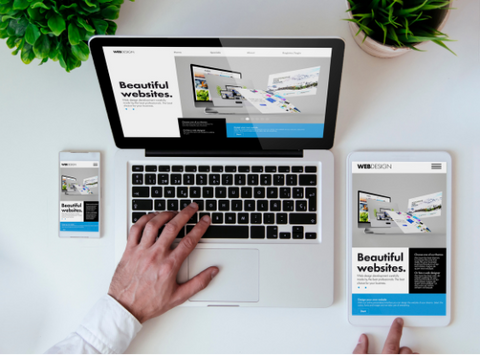
Responsive website is one that automatically adapts to the size of the device it’s being viewed on. The site looks good no matter what, whether it’s being viewed on a desktop computer, tablet, or smartphone.

Responsive web design is all about making sure that your website looks as good on mobile devices as it does on desktops. It’s an important part of any successful web strategy because more people are browsing the internet on their phones than ever before.

HYBRID

Hybrid web design is the combination of two or more designs to create a unique and cohesive look. This is not to be confused with a hybrid application, which is something that runs on multiple platforms.

Hybrid web design should not be confused with responsive web design either.

Responsive web design is when a website automatically adapts its layout based on the screen size of the device being used to view it.

A good example of a hybrid web design would be one that uses both flat and skeuomorphic elements in its design. For example, suppose you were designing an e-commerce site for women’s clothing and wanted to keep it clean and modern. In that case, you could use flat icons for navigation buttons but have a few skeuomorphic details like drop shadows or gradients on buttons that actually do something like “Add To Cart.”

The 4 Main Types of Web Development

 FRONT-END DEVELOPMENT

Front-end development is the process of building user interfaces and providing users with an interface that allows them to interact with a website or application. Front-end developers are responsible for creating websites and applications that are visually appealing and that work properly across different devices, platforms, browsers, and operating systems.

BACK-END DEVELOPMENT

This type of software does not need to be visible to users. It is something that works behind the scenes and helps with creating a website. The best example is when you are looking for something on Google. You type in your keywords, and then you get results from different websites on the internet. This is all done by back-end software.

 MOBILE DEVELOPMENT

Mobile development is the process of developing a mobile application for mobile devices, such as smartphones and tablet computers. Mobile applications often stand in contrast to desktop applications that run on desktop computers since the feature sets, usability, and design of mobile applications are often more constrained than those of desktop software. Mobile applications frequently utilize touchscreen input (e.g., swiping, tapping) and accelerometer and geolocation sensor input methods, which are features of many modern smartphones.

The rapid adoption of smartphones has led to a significant shift in the way users access services on the Internet and interact with one another socially. This shift has extended to business activities as well, where it is becoming increasingly common for employees to use their own mobile devices in lieu of traditional desktop computers while at work.

FULL-STACK DEVELOPMENT

Full-stack development is the activity of developing an entire application.

It involves building both the front-end and the back-end of an application, as well as coding for all aspects of it, such as the database or its security features.

Full-stack developers are often well-rounded programmers who are able to work on every part of a project, rather than specialize in one particular area.

Web Developer vs. Web Designer: What’s the Difference?

You may be wondering, “What exactly is the difference between a web designer and a web developer?”

Well, let me explain.

A web designer is responsible for the look and feel of a website—the colors, fonts, images, etc.—while the developer creates the code that makes it work. A good developer will have some design skills (for example: understanding how to use HTML/CSS), but this isn’t mandatory; you can always hire someone else as your designer if you don’t want to learn it yourself. The opposite applies too: many designers have no coding knowledge whatsoever!

You see where I’m going with this? There’s no need for it to split hairs about who does what in the field; they’re all just people who love working on websites together.

WEB DESIGN AND DEVELOPMENT ARE TWO SIDES THAT MAKE UP A COHESIVE WHOLE WHEN IT COMES TO MAKING WEBSITES, YOU NEED BOTH.

Essentially, web design is the art of making websites look good. Web development is the science of making websites work. They’re two sides of the same coin—you can have one without the other, and it wouldn’t be a very good website, but together they are what make up a cohesive whole when it comes to making websites, you need both.

What Does Web Design Agency Do?

A web design agency builds websites.

But wait, what does that mean?

A web design agency creates the look, feel, and function of your website—the whole package. They’ll work with you to develop a website that reflects your brand and serves its purpose: telling people who you are and why they should buy from you.

Web design agencies use their skills in graphic design to create clean, beautiful interfaces for your website. They also know how to build websites that are optimized for mobile devices so that anyone can access your site on any device at any time.

A web design agency can make your website into something that you can be proud of—something that will make your business stand out from the crowd.

Or in the simplest words, a web design agency does all the things you wish you could do yourself but don’t have the time or energy to.

Related: 5 Things Every Great Home Page Has! Strive Enterprise Websie Tips & Tricks Blogs

Subscribe to Jose Silvera’s YouTube channel and get our Website Tips & Tricks twice a week, live!

Get the Best Web developers & Online Marketers in Las Vegas, Nevada

Strive Enterprise Official Website

Check out our Portfolio

We Also Offer Digital Marketing For Small & Big Businesses, SEO, E-Commerce, WordPress, PPC Campaign Development & Management for Google, Bing & Yahoo!, Facebook Ads, and more!

We wish you great success!

See you soon!

8 Ways To Use Images More Effectively In Your Site Design

Websites are like a box of chocolates: you never know what you’re going to get. Sometimes they’re filled with images that make your eyes bleed. Sometimes they have pictures that look like they were taken by a drunk chimpanzee with a cell phone in your pocket– I’m looking at you, Instagram…

Disclaimer: I’m not good at taking pictures either 🙂 But hey! I’m good at this, don’t worry.

Anyways, how can website creators be sure their sites aren’t the bad ones? By using this simple checklist for finding, choosing, and using images that will make people hungry for more!

See?

It’s the internet — we are completely surrounded by images. Whether it’s a meme that was shared on Facebook, images in news articles showing what is going on in the world, or an enormous product photo on a website that proves to you that yes, this object might fit inside your house… Images matter.

They’re everywhere on the internet and they can be a huge asset to your website if used effectively. Wondering how to use them effectively? Let me break it down for you.

Find the Right Images

Using the right image can be a powerful tool, whether you’re trying to communicate a message or simply enhance your website’s look and feel. But finding the right image can be a challenge.

There are two main things to consider when choosing an image: what it looks like and how it’s used. The first is easy enough but the second is more complex because it involves matching an image with its context.

Tips for making sure that happens: Don’t assume that every image will work well in every situation. Images are more flexible than text, but they still have limits. A photo of a puppy might work well on a social media site where users want to express their affection for animals, but it probably wouldn’t be appropriate for an article about business ethics!

The first thing you need to consider when using images is who your target audience is. This will help you decide what kind of image you want to use. For example, if you are selling a product aimed at women, you will want to use an image of a beautiful woman wearing your product.

 Don’t Overdo It

If you’re going to use images, make sure they support your message. Don’t use them to replace it; that’s not their purpose. Images are meant to aid understanding, not distract from it. If you’re using an image of a person or animal and there isn’t anything particularly unusual about them (such as their age or ethnicity), don’t put a caption on top of the image that says something like “This is a man.” Instead, let the reader figure out what gender this person is from context clues such as how they were dressed and what kind of situation the photo was taken in (for example: “This is Sam from his wedding day”).

The same goes for color-blindness: if you can’t tell by looking at someone whether they’re male or female, don’t assume everyone else can either! Use gender-neutral language whenever possible. This will help ensure that all readers can understand what’s being said without needing any special instructions first—and that includes those who may be new readers themselves!

 Pay Attention to File Formats

File formats are simply the way in which information is stored on your computer or mobile device. You may have heard of some of them (like JPEGs and GIFs) but others may be unfamiliar to you.  

Images come in different file formats such as JPEG, TIFF, BMP, PNG, etc. Each format has its own advantages and disadvantages. For example, JPEGs offer good compression but may cause image artifacts when resized or processed in some editing programs. On the other hand, PNG files are better suited for transparency effects than JPEGs but can’t be compressed as much as JPEGs.

What makes an image optimized?

When it comes to images, “optimization” refers to how they’re displayed on your site – including size, resolution, and color depth (also known as bitmap). Each type of file format has different characteristics that impact how effectively it can be used for certain purposes.

Related: 8 Usability Mistakes You Might Make When Using Photos on Your Website

The file format you choose is a very important decision because some formats are more suitable for certain uses than others. For example, there’s no point using a JPEG image for your website when GIFs will do the job just fine. To find out what format to use, you’ll want to consider each of these questions:

  • What file size do I need?
  • Does it have to be in a specific format?
  • Is there anything else about this particular image that matters?

 Use Strong Clear Images

 A strong, clear image can be used to a website’s advantage in a number of ways.

First, it can help your audience understand what you’re talking about. If they see an image that’s similar to what they’re looking for, they’ll know that they’ve found it. This also applies to search engines like Google. If an image is clear and easily deciphered, Google will be able to find it and use it as a way to help bring users back to your site again and again—which means more traffic!

Second, if you use strong images to connect with your audience on an emotional level, they’ll feel like they know you better than if you only relied on text alone. This can be especially helpful when trying to sell an idea or convince someone of something; if the person feels like he knows you well enough through your writing style (and also through how clearly everything is presented), it’s much easier for him to trust you!

Finally, using strong images can help build trust between two people who haven’t met yet. For example: if I’m interviewing someone for my podcast but we haven’t met yet, I might send them a link so we can Skype together before our recording session begins—and if there’s a clear picture of everything then we can build trust with each other through that conversation alone.

Choose Images That Work Together

There are many ways to use images that work together on a website.

You can choose an image for the header and then use other images that relate to that same concept for the body of your page.

You can also choose one main concept for your site, like “eco-friendly” or “green” and then use different images that all fit into that theme.

You can even match an image to the text on the page. For example, if you have a paragraph about recycling, you might choose an image of someone recycling bottles or cans in their backyard.

 Optimize for Mobile Devices

Although it’s a little-known fact, optimizing images for mobile devices can be used effectively on a website.

Mobile devices have changed the way people use the internet. More than 50% of the traffic on most websites comes from mobile devices. The problem is that most websites are not designed to work well on these devices.

The main reason for this is that they are optimized for desktop screens and not mobile ones. This means that the images on websites don’t display properly or load slowly.

Optimizing images for mobile devices helps to use them effectively on Websites. It reduces their size and makes them easier to load. This allows users to access your website quickly and easily regardless of what device they’re using.

There are several ways you can optimize images for mobile devices:

  • Using a service like TinyPNG or JPEGmini will compress your photos so they take up less space and load faster across all platforms including desktops, smartphones, tablets, etc.
  • Reducing file sizes by resizing images down before uploading them so they don’t take up too much space on your server (or disk space if you’re using a CDN). You can also reduce file sizes by reducing the quality of an image (although this shouldn’t be done without careful consideration as it may cause artifacts in photos).

Consider Accessibility and Diversity

Accessibility and diversity are two of the most important elements to consider when creating a website.

Accessibility is the ability for people to navigate your site easily. It’s also about making sure that your content is available to everyone, regardless of their abilities. In terms of diversity, it means that you’re trying to make your site appeal to as many people as possible—whether or not they’re male or female, old or young, from a specific region or country, etc.

When you consider these two elements together, you’ll have an online presence that is more accessible and diverse than ever before!

Keep It Real

How keeping images real helps use them effectively on Websites

The best way to use images in a website is to keep them real.

There are many reasons why you should use real images and not stock photos, such as:

Real images are more attractive and engaging.

The most important reason is that people are drawn to real things, not to models or computer-generated graphics. Real images attract attention with their natural beauty and draw the viewer’s eye to the page. The viewer can see what the image is about and connect with it because he can relate to real objects or people much better than to abstract ones that have been produced by a computer program.

Real images increase credibility and trust.

People tend to trust websites that use real images more than those that use stock photos because they know that the website owner has invested time and money into making sure his business is represented well online. If he was willing to go through all of this effort just to make his website look good then it must be worth something! This creates a sense of credibility and trust which allows users to feel safe when buying whatever product or service you’re offering online

Related: Getting a Website: What You Need To Know

Images are an important part of web design. Use them wisely!

In the digital world, images are a key part of web design. They can help you convey a message, make your website more attractive, and even create a better user experience (and yes, they’re also great at making websites memorable).

To use images effectively in your designs, follow these tips:

  • Use high-quality photos when possible. If someone visits your site and sees poor quality pictures—or worse yet no pictures at all—they might think your business is cheap or disorganized. When choosing images for your site it’s important to keep this in mind!
  • Be selective about where you place them on the page; don’t just throw them around randomly or place too many together in one area (this could upset visitors who find it overwhelming). This tip is especially true when working with multiple columns as well because this can cause confusion among visitors who may not know how many columns exist on each side of their screen!

CONCLUSION

After all, a picture is worth more than a thousand words. Or at least I think that’s the saying. I’ve never actually counted the words in an image. But if you have any questions about images or design in general, feel free to reach out to us here at Strive Enterprise or leave your comment below and we’ll be happy to answer them for you!

We wish you great success!

See you soon!

by Charleen Montano June 7, 2022

home Flag es Mobile Español